Thursday, February 15, 2007

ERIC on the Internet

Most teachers know ERIC because any serious research paper often required time at the ERIC terminal in the library going blurry-eyed at all the small print. The good news is that you can go blurry-eyed at home. ERIC is on the Internet.

Sorry for not posting for a while. I was stuck in the blizzard in Chicago. :-(

T

Friday, February 09, 2007

Yahoo! Pipes

Yahoo! has just released a new service called Pipes. It is a system for combining information from a variety of Internet services and then repackages it in a variety of ways. This is not for the regular user. It might be a very good source of projects for your school's computer classes.

T

Thursday, February 08, 2007

One Laptop Per Child Security

Thankfully someone has decided to add security before they put something out. The OLPC people have created an innovative collection of security features -- mostly available now in pieces -- so that children will have security has strong as a high security government agency. Wired Magazine has a good story on the new security system. If you want to see more of the details, look at OLPC's Wiki.

Let's hope that more operating systems will incorporate these features.

T

Wednesday, February 07, 2007

Meebo takes the risk out of IM


Meebo is a service I've following and using for quite some time. It's a web site that allows you to open up all your instant messaging accounts at the same time. When you log in to Meebo, it logs you into all your IM accounts. Obviously, you need an account with each provider and you need to tell Meebo your user name and password.

What I like about Meebo is that it does not install into your operating system. This greatly reduces security concerns and it means that you can use any computer with an Internet browser. Of course, advanced features, such as voice and video do not work.

If you're interested in managing all your IM accounts while reducing security risks and CPU drain, this is the service for you. And, it's free.
T

Tuesday, February 06, 2007

Hamachi for Off-site Backups

This is not the first time I've written fondly of Hamachi. While it is especially popular with gamers because it creates a local network between players in remote locations, I've recently been able to use its file sharing feature along with my standard backup utility.

The main problem with off-site backups is getting the information some place safe without the hassle of carrying multiple CDs or DVDs. A USB device isn't large enough and carrying around an external hard disk isn't very appealing.

There are some online storage areas, but nothing is so wonderful that I can recommend it. I suspect this will change over the coming year. Hamachi is a free software application that creates a secure network between a number of computers. This can be two computers or hundreds.

Last night I turned on the capability of sharing local drives. I then mapped the remote main drive of my remote server and then used my backup program as I would normally. Naturally, this is not a fast way to backup, but it's as fast as an online storage system and there are no storage fees. If you're like me, you have plenty of extra space on your local hard drive.

One last thing, it would be a good idea to encrypt the folder you plan on saving the backups. You don't want to take a chance with your data being exposed from your computer. As for the connection during the transfer process, Hamachi is more than secure enough for that. One last thing: Hamachi runs on Linux and OS X, as well as on Windows.

T

Monday, February 05, 2007

MediaMax: Online Data Backup

MediaMax, formerly Streamload, is offering 25 gigs of free data storage. The features look great and the storage amount of 25 gigs is better than anything else I've seen. I've been using it for several weeks now and while it has come in handy, the software does not always work -- at least not in a way that I recognize as working. The application screen can get stuck in a mode that appears to be frozen, but the processor stats tell me that it's working like crazy. I cannot recommend using this system at this point in time but I'm going to activity follow this product so that when it becomes more solid and easier to understand, I'll be ready to use it.

T

Thursday, February 01, 2007

Which Linux Distro is right for you?

This is a great site for comparing the various Linux distributions.

T

Wednesday, January 31, 2007

Flash cards that work

Flash card systems were probably one of the first educational tools used on a computer. They were never very popular because one had to enter lots of information just to get started. Memorizable is a site that actually makes flash cards on a computer make sense. You can share your terms -- great for a class -- and you can use pre-existing sets of terms.

Give it a try and let me know what you think.

T

Tuesday, January 30, 2007

Testing out VMware

Yesterday I covered Xen Express. VMware has a utility called VMware Converter that will convert a normal server into a VMware server. This is a great way to test out the system to see if you like it.

T

Monday, January 29, 2007

A quick route to virtualization

I don't think there is any doubt that virtualization of servers is going to become the norm. This is especially true with Linux-based systems. Xen is one of the virtualization technologies I like the most. Because of the way it interfaces the virtual server to the hardware in a very direct way, it's very fast. It does lose some flexibility that other virtual servers enjoy, but I think it is a good trade-off. Also, Xen is great for moving between virtual servers. You can copy a virtual server to another server and switch in real-time between the two. That can be very important if your system has to be up all the time.

The one problem traditionally with virtual servers has been the difficulty of setup. Virtualization not always an easy concept to work with. XenExpress is both free and made as simple as possible. If you have a spare computer, give it a shot.

T

Friday, January 26, 2007

Learning Office 2007

Microsoft's new Office 2007 is one of the more interesting new offerings. It comes with a new interface and new file format. The benefits will be significant and so will be the training curve. If you're like most schools, you don't have much time for training. Kind of odd given that's what schools are in business to do. This new version of Word comes with may keyboard shortcuts. Fast typists can often work faster from the keyboard than they can using the mouse. This article at LifeHacker gives cheat sheets on these new commands.

T

Tuesday, January 23, 2007

Strong Password Generator

Here is one of many sites that creates a strong password. While there are a number of sites that can do this, this site creates a text string that makes it a bit easier to remember. For example, #h7M5%�7 comes with a string: # harry 7 MICROSOFT 5 % � 7. Some people may find this easier to remember and anything that can help people to have stronger passwords is a good thing. Also, you may be able to write down this password for your wallet with less fear that some will figure out that it's a password.

T

Monday, January 22, 2007

Is there an open source program for your schoo?

One of the biggest problems an educator has when looking for open source software is finding something that works like something already in use. Open source programs usually don't have marketing budgets and Google searches don't always help because many open source programs are still in development or have been abandoned years ago. You probably cannot ask your buddies at school which open source program they like because they don't use any or don't know that they are -- for example, FireFox. OSalt.com is a site that lets you see which open source programs are viable alternatives to commercials programs. And, remember, you don't need to run an open source operating system to run many open source programs. Many of them work great on Windows.

T

Friday, January 19, 2007

Get back deleted files

Recuva is a beta version of a new file undelete program. I've used a number of these programs and this one looks like it will be a good one.

T

Thursday, January 18, 2007

Create your own network

I cannot believe that I've failed to mention Hamachi until know. They have one of the cleanest security and communications products I've seen. Security systems often are as difficult for the users as they are for attackers. addresses, you traffic is unseen by the normal scanners. While you can still be seen by packet capturing systems, it's nice to be invisible to most attackers. On top of this, Hamachi creates a private network between you and the people on your network. Because Hamachi uses its own IPHamachi includes a fairly high level of security. I've used the system and found it to be easy to use. Give it a try.

T

Wednesday, January 17, 2007

TightProjector for screen sharing

The people of TightVNC -- a remote control software program -- have decided to create a program that defies marketing. TightProjector is software that allows one person to share a screen with unlimited numbers of people on the same network. This would be great for a computer lab. Below is what they have to say about their product.

T

TightProjector is a software that can transmit the screen of a particular computer to other computers in the same local-area network. The data is transmitted continuously, in real time.

Usage examples:

  • broadcasting a presentation to multiple networked computers
  • showing a class of students operations performed by a teacher

Tuesday, January 16, 2007

Is Vista good for you?

There are many opinions about Vista. See for yourself if Vista is good for you by taking Microsoft's test drive of Vista. Vista has a number of good and a number of bad points. Try it.

T

Friday, January 12, 2007

iRemote

iRemote is one of several remote control products on the market. While many of these solutions are expensive, this one is free. There are other solutions that are free, but the number that are both free and have encryption built in are few. If you are setting up some remote control for your own uses, TightVNC is one I would strongly consider. The only reason I would not go with TightVNC now is because it requires one to tunnel through SSH in order to have end-to-end encryption -- apparently a future version will add more security. iRemote is good for people you have to support who don't have any technical skills on their end -- which is one reason you're probably going to be supporting them. :-)

T

Thursday, January 11, 2007

FileMenu fixes explorer

FileMenu is a free Windows utility that adds features you wish Microsoft had added to its filer explorer. I especially like the folder synchronization features.

T

Wednesday, January 10, 2007

Make cliches drop dead as a door nail

Cliche finder is an interesting service that I know many teachers will be as pleased as punch with. Students may also find themselves jumping with joy. This free service allows you to paste in some text and have it find all the cliches. Less pain for both students and teachers -- a win-win solution. It's not perfect. It did not notice the cliches I put into this description. I'm sure your students will have better luck. ;-)

T

Tuesday, January 09, 2007

Google Talk School Cell Phone

Schools usually do a pretty bad job of providing phones to staff. To make matters worse, teachers frequently move between rooms -- and thus between phones. While office workers may leave the building to smoke or pickup some coffee, teachers frequently are on the job in play grounds and monitoring the loading and off-loading of school buses.

Clearly, school staff require mobile phones. While cell phones and signal repeaters can work, the cost of 40-70 dollars a month per phone can be opressive. Nokia has a Linux-based phone that run's Google's free talk service. Because the wireless signal is that of your computer network and not from a cell phone tower, you have great control over where the phones will work. To make make things better, the phones can operate on the Internet and be used to access school systems. So, for example, you want to find a parent's telephone number or look at the school calendar, this unit would be able to do it easily and for free. Google has just announced a new version that offers faster speed and more features. While the price of $300-400 may seem a lot when compared to the free cell phones the big carriers give away, the price is not all that much when one thinks of the monthly service charges and extra control your school will have.

T

Monday, January 08, 2007

An educational robot

The people who make the automated vacuum cleaner have a version that is for educational purposes. They have just announced it so I don't know much about it other than that it's programmable. BTW, the same folks are making robots for bomb investigations in Iraq.

T

Friday, January 05, 2007

Protect yourself the NSA way

The NSA has a very useful document on how to protect your network. While some of the recommendations are a bit extreme for a school environment -- such as the number of passwords one has to have before reusing one -- the general recommendations are excellent. Many of the steps are free. I especially liked the section that provides information on how to setup your firewall to block out-going bad traffic. The file is in PDF format.

T

Thursday, January 04, 2007

COMODO Free Firewall

Here is another free firewall. This one has been getting good reviews and has a number of known good applications already listed in its database. This means that when good applications attempt to contact the Internet they are let through. I don't know about you, but I don't always know if a program is good or bad. The names rarely give it away.

In any case, you should have a firewall on all your computers. Just having a firewall between you and the Internet is no longer enough these days.

T

Wednesday, January 03, 2007

Your next telephone system?

Asterisk is an open source and free telephone replacement system. You still have to purchase telephones and computer equipment, but the software is absolutely free. Asterisk has a reputation for being difficult to setup but solid once it's going. Take it from someone with experience with traditional telephone systems, the only reason they aren't difficult is because the high sales prices includes a complete installation and configuration. You then purchases a maintenance contract to keep it going. If you don't feel comfortable handling a telephone system on your own, there are firms that you can hire to help with the installation and support. Even if you are happy with your current system, Asterisk can be linked to your current PBX to supply voice mail and other advanced services.

You really ought to consider Asterisk when it comes time for your school to replace its telephone system.

T

Tuesday, January 02, 2007

Software collection for students

There are many free programs that students could take advantage of. The problem is knowing about them and which ones are the best for a specific task. The SoftewareFor organization has created an ISO image that can be downloaded and burned to a CD. The student can share the disk and install whatever they like from the collection of programs.

This is a great resource for anyone needing to save money on software.

T

Friday, December 29, 2006

Scribus: Open Source Publishing

Most people get stuck buying an operating system they did not want because some program they had to have was only on that platform. Desktop publishing is one of those pieces of software that can determine the computer and operating system one purchases. Scribus is an open source desktop publishing application that works on all the major operating systems. It also claims to be lighter on the hardware requirements. Of course, it is less feature rich at this point in its development but that should not be an issue for a school computer lab or school newspaper.

People frequently claim that students need to learn on the systems used in the public. I find that this is often a unwarranted requirement because it's the task and procedures that are important. The menus and shortcuts are always changing even within a single product. Take MS Word, for example. Compare Word 2000 with the new Word 2007. Not much being transferred between those two versions. So, unless you are teaching graphic arts to soon-to-be professionals, make your decision on other factors.

T

Thursday, December 28, 2006

Creat PDF on the Cheap

Adobe's PDF is a wonderful tool for accurately transmitting electronic documents. Adobe's Acrobat program is a good tool for creating PDF documents but it is quite expensive. PDFcreator is a free tool that works in Windows to create PDF documents. If you just need to read PDF documents, use Adobe's free Acrobat Reader. They just came out with a new version with a number of valuable additions.

T

Wednesday, December 27, 2006

Teaching Markets to Students

Betocracy is a predictive market system. By "buy and selling" shares -- no money involved -- various alternative outcomes can be weighted. So, for example, if you wanted to predict the outcome of the next three basketball games, students could trade shares such that the own shares in the alternative they believe is most likely. Naturally, the more popular picks are the most valuable/expensive. This is a great system for learning about markets and economies. The system is in beta, but that does not stop you from testing it out now.

T

Tuesday, December 26, 2006

Search Engine for Kids

Quintura for Kids is one of more interesting search engines I've seen for kids. Most of the other search engines for kids are based on the application of strong filtering and some content reorganization. Quintura uses an associated search feature that I think kids will really like. You put your cursor over a word and associated words appear. Hard to describe in words -- go there and take a look.

T

Tuesday, December 19, 2006

AmberJack site tour

AmberJack is an open source project that allows you to create a guided tour of a web site. Essentially it is a series of screen snapshots with comments. This site is very useful for helping students learn a new site and for helping parents figure out your school's site.

T

Monday, December 18, 2006

University Podcasts

Open Culture has a list of university podcasts. While the list is not exhaustive, it certainly provides great examples on how to create a podcast. Certainly some good holiday listening.

T

Friday, December 15, 2006

Make Linux look like Windows XP

Here is a review of a version of Linux which is designed to look like Windows XP. While the newest versions of Linux look great, the cold reality of school life is that some people won't accept any form of change. Providing a version of Linux that does not appear to change things can help. Naturally, there will still be many differences, but hopefully your users will only find out about them after they fall in love with Linux.

T

Thursday, December 14, 2006

Fixing your photographs

Schools work with a lot of photographs. There are the school newspaper and year book, but students working on project in the computer lab also want to insert photos. This blog gives some great advice on how to fix photos with fairly common techniques.

T

Tuesday, December 12, 2006

Wikia: Having your own Wikipedia

Wikia is a project created by the same people who created Wikipedia. Basically, this site gives you the same type system they use for Wikipedia on a system that gives you all the storage space you want. All of this is for free. Here is a good news story on the new site.

T

Monday, December 11, 2006

Linux BIOS

The BIOS is the first operating system a computer user sees. While you may run Windows or OS X, you also run a BIOS. The majority of the time, no one ever changes the BIOS no matter how many times the operating system may change. The LinuxBIOS project replaces the operating system on the BIOS chip with one of its own design. Why should you do this? For one, it loads Linux in about three seconds. This is actually a very important factor if you have to restart your Linux computer for any reason. Another nice factor is that it allows you to use some services, such as redirecting the console to the serial ports. Rack mounted servers usually have this in their BIOS settings, but a converted old PC will most likely not have this feature. So for no money you can squeeze more services and performance out of your old hardware.

Of course, make sure your hardware is supported before installing and have a copy of your old BIOS just in case you want to go back.

T

Friday, December 08, 2006

Podcasting 101

Make magazine has a number of useful links for educators wishing to create a podcast or to find good educational podcasts. Check out the Podcasting 101 link. It's an excellent place to obtain further information.

T

Thursday, December 07, 2006

Video conferencing for multiple locations

Paltalk is offering video conferencing for groups up to ten people. In reality, you're not going to have more people unless you have a 50 inch screen.

This is a great solution if you want to have multiple classes work together from remote locations.

T

Tuesday, December 05, 2006

Academic Search Engines and Sources

Marcus Zillman, one of my favorite bloggers, has published a list of academic search engines and sources. This is one of the best resources I've seen on this topic. You should print this out and put in a place that your staff can easily find.

T

Monday, December 04, 2006

Finding your next school Wiki

While we know that Wikipedia is the best known wiki in the world, that does not mean it's going to be suitable for your next wiki project for your school. The good news is that there are many types of wikis available -- many of them for free. WikiMatrix helps you to determine which wiki is best for your purposes. Even if you don't plan on using a wiki any time soon, this site can help you to understand what wikis are.

T

Friday, December 01, 2006

Getting money for your school projectsD

Donors Choose is a very interesting site dedicated to matching people with small amounts of money with small school projects. If you cannot get a big grant for your next school project, this site may be a good way to get part of it funded.

T

Thursday, November 30, 2006

Ideas for Web Site Design

flixr has an interesting site devoted to examples of good web site designs. Since you probably won't have enough money for a designer for your next school web site, this is good place to see what you want.

T

Wednesday, November 29, 2006

Citing Google Books

The Chronicle has a good article on how to reference information found on Google books. This information can also be applied to all forms of online materials. This is an increasingly more common issue -- and most reference books don't provide information on the subject because the need is a recent one.

T

Tuesday, November 28, 2006

Zemble Text Messaging System

Zemble is a social networking site that uses text messaging for communications. This system could be quite useful for a school. It could be used to send out notices about school events and announcements of snow days.

T

Monday, November 27, 2006

Wikipedia CD-ROM for Schools

A selection of educational articles found on Wikipedia can now be obtained on a CD-ROM. This article describes the project that put together the CD-ROM and provides a link to downloading it.

This prepared CD-ROM is great for schools with a need for an online encyclopedia. Because the articles are selected by volunteers, you can be sure that the articles are truly educational and of good quality. This is a real benefit for younger students.

Another benefit of having a CD-ROM is that it can be used locally. Searching off a CD-ROM or from a local hard drive is going to be much faster than it would the same search over an Internet connection. You can also make copies to send home with students. The CD-ROM is free of charge. All you need to do is to down load it and burn it to a CD-ROM.

T

Friday, November 24, 2006

Foiling Keyloggers

A research group at Microsoft has come up with a simple method for defeating keystroke loggers. A keystroke logger is a software program or hardware device that captures all the keystrokes typed on the computer. The resulting collection of letters can then provide a hacker with your user name and password. It does not matter if you use encryption because the keystrokes are only encrypted after they have been received by the application you are using. The keystroke logging program captures the letters before they are encrypted. In the case of the hardware devices, they capture the characters before they even reach the computer. These devices often attach to the end of the keyboard cable just before it plugs into the computer.

This new method requires that you open up a second application, such as Notepad, and type in some characters in it between typing in characters in the password field. So, if your password is "safeenough" you would type "safe" in the password field and then type "dfafioiueeffda" into Notepad. After entering these extra characters into Notepad, return to the password field and complete the password. The application gets the correct password and yet any keystroke logger will see "safedfafioiueeffdaenough" as your password. Obviously, if you do this process a couple of times while entering the password, the effect will be even better.

You should use this security process anytime you are at an untrusted computer. And, of course, this system assumes that your password is being encrypted before it leaves your computer. You should always see the lock symbol on the browser anytime you're entering passwords or other sensitive information.

Remember, it's not just passwords you need to protect. If you have to type in anything else that needs protecting, such as social security numbers, use this system. Of course, if you can avoid untrusted computers, that would be great but often we do not have a choice.

T

Wednesday, November 22, 2006

Windows Fundamental for Legacy PCs

One of the killers of old equipment is the newer and more bloated operating systems. While hardware gets cycled out of most places every four years or so, the hardware is probably good for eight to ten years. Naturally, keyboards and mouse systems will die before then, but he basic components on the PC will be alive long after you wished that they weren't.

Microsoft has a little-known -- at least I have not heard of it until recently -- version of XP that is designed for older hardware. Only people who have the Microsoft Assurance Program. Usually, this means corporations but school districts may have it too. The operating system is designed to be a platform for the Microsoft remote desktop client. You will not be getting a fully functional Windows XP system. For older hardware, that ship has sailed. But if you have a boat load of older systems, getting this skinny version of XP along with a Windows terminal server could be a good option.

I also like the fact that this system improves your security situation. First, it allows you to run an OS that is being patched. Older systems often come with unsupported operating systems. This new OS puts you back into a supported environment. The second thing that improves security is the limited amount of functionality. Your students are going to have a more difficult time screwing around with computers with this limited OS simply because there is less they can do. With computer security, less is more.

T

Tuesday, November 21, 2006

Homemade Telephone System

Schools were not built to provide access for telephones. Installing a telephone system can be an expensive proposition. Given that most teachers have cell phones, why not use them? Most people have calling plans that make local calls free. Using cell phones also means that your staff can be reached regardless of their location -- even outside the building.

The main problem with cell phones as an alternative telephone system is reception. A system that requires a teacher to find a window to stand next to is not going to work. This is where having a cell phone signal repeater comes in handy. It takes a signal from the outside of the building and transmits it to the inside of the building.

The repeater has the ability to support multiple antennae cables. This allows you to wire up different floors or sections of a building using just one repeater. One downside is that if you want to support multiple cell phone vendors, you may require more than one repeater. Each repeater is configured for a specific frequency range. So, for example, T-mobile and Verizon may use different frequencies. If so, you would need a unit for each. Fortunately, they both can use the same internal cables to transmit their signals.

Oh, and one more thing: this system will make it easier for your students to use their cell phones too. The repeater does not have the ability to recognize specific cell phones.

T

Monday, November 20, 2006

Creating a cheap server

Here are some great instructions for how to create a low-end Linux sever for under $80. The hardware is $50 and the shipping is $30. Now, because you have a school, you may have a stack of donated computers to figure out. Let's face it, a donation can be a mixed blessing. You risk the wrath of the donor if you toss out the equipment or you end up invest so much time in fixing and maintaining the computer that a new computer would have been less expensive. Using an old computer as a Linux server makes a lot of sense. Linux runs great on low-end equipment. You don't have to use the old keyboard, mouse and monitor. These parts are probably broken, anyway.

The instructions above provide for a fairly general purpose server. If you just want a firewall or email server, you can use even older computers. In the case of the firewall, you don't even need the hard drive.

If you don't have donated computers, you may go to a recycling center (see this posting) or purchase from one of the online resellers (see this posting). And, don't forget that these old units can also be used for terminal server clients.

T

Friday, November 17, 2006

Reverse Dictionary

There is a wide selection of online dictionaries but OneLook is the first "reverse dictionary" I've come across. It's great for situations where you know what the word means but you cannot remember the actual word. This could be useful for students and for your own work. It also works nicely as a type of thesaurus. It also has the ability to check the definitions of words you find in multiple online dictionaries.

T

Thursday, November 16, 2006

Keeping the little kids safe on the Internet

Middle school students and older may be actively looking for naughty content on the Internet, but most younger students simply stumble on it. While filters can help, they are not perfect. In Google, for example, one can still see the image icons for sites that one may not be able to visit. Even with the Google safety filter turned on, a great number of questionable images can appear.
The Zoo.com search engine goes a few steps beyond Google's safe search to make sure the content is acceptable for children. And, there are no images. The chance of accidentally hitting a bad site is greatly reduced. Combine this with a halfway decent filter and your school should be reasonably protected.

One more thing: you're not giving up Google to use zoo.com. They search Google and Yahoo! to obtain the search results. They just clean up the results list first.

T

Wednesday, November 15, 2006

Control your server closet on the cheap

As your server closet gets more crowded with more and more servers, switches, routers and firewalls, the ability to monitor them becomes an increasingly difficult task. I started using KVM switches (Keyboard/Video/Mouse) to control my servers, but as the number of servers increased, I found that the tangle of thick KVM cables became a real bother. The back of my servers is already a web of Ethernet and power cables. The KVM cables made things a lot worse and in some cases would knock loose a power cable and bring down a server.

An alternative method for controlling equipment is via serial connections. Most networking devices come with some sort of serial port. In some cases the port looks like an Ethernet port and is often labelled "console" and in other cases the serial port looks like the typical serial port on the back of your computer. What many people may not know is that most servers have the ability to be controlled via the serial port. There are limitations, such as no mouse control and no graphical interface, but these are not limitations for servers controlled via the command line. While Windows can be controlled via the command line, most people don't do so.

Even if your computer does not have the ability to redirect your video and keyboard output to the serial port, Linux and Unix have utilities that make this possible. So what are the advantages? Price is a big one. KVM switches, especially ones that can be remotely administered, can be expensive. The PortMaster box shown above is under $200. You will not find a KVM device that can monitor 30 units for anything close to this price. Another advantage is cable management. Instead of a three-part KVM cable, you're only running a serial cable. And, with special connectors, you can run an Ethernet between devices and plug it into a serial port adapter. This means that your equipment can be hundreds of feet away.

The one downside to the PortMaster box is that it does not come with an encrypted access port. This means that you need to use either a modem to connect directly to the unit or connect securely to one of your computers via SSH and then telnet over your internal network to the box. That's not a big constraint, but it's one you need to be aware of.

As I get more experience with this unit I post on my experiences.

T

Tuesday, November 14, 2006

Where to find free academic podcasts

A company called Productive Strategies has created a page with a number of freely available academic podcasts. I'm a big fan of podcasting. I think they are a great advance over radio. That a listen and see what all the excitement is about.

T

Monday, November 13, 2006

Online Book Summaries

LitSum is the best collection of book summaries I've seen. This site could help students to know if they want to read a particular book. It also good to know what's out there in case a student tries to pass off one of these summaries as their book report. Using online information is one of the problems the Internet has brought to the classroom. It's not that cheating was not going on before, but it is certainly easier now.

T

Friday, November 10, 2006

Who says graphic design cannot be open source?

Blender, when combined with programs such as GIMP, Ink Scape and NVU make for a fairly complete design setup. Blender is a three-D design tool. GIMP is like Photoshop while Ink Scape is like Illustrator. NVU is a web design tool, like Dreamweaver. I've used GIMP and found it to be quite usable. Some of the features are beyond me, but then so are many of the features in Photoshop.

T

Thursday, November 09, 2006

Real-time Web Collaboration

Thinkature is web based collaborative brainstorming space. It's like having a whiteboard for a project group meeting. This could be a useful tool for students attempting to put together projects. It also can be used to teach concept mapping and brainstorming skills. There are other systems like this one, but this is one of the best I've seen that is offered for free.

T

Wednesday, November 08, 2006

The Free Online Backup Site You Already Own

In July I posted on Microsoft's new FolderShare program. FolderShare allows you to synchronize data from one computer directory to one or more other computers.

One of the nice features of this system is that it takes advantage of the fact that most computers have more than enough storage space. There is no reason to pay some firm to store data online when your home computer is sitting there with lots of extra space and an always-on broadband connection.

Since July I've been using FolderShare and have found that it works well for simple file sharing. FolderShare pretty limited when compared to true backup systems. It can only handle ten libraries or packages of data. This may not sound too restrictive until you find out that it cannot share an entire drive letter. So, if your data is all under drive D, you cannot make a share out of drive D. You must go into the sub-directories and share them separately -- and be under ten. This is possible for small organizations and for individuals. Of course, one could set up multiple FolderShare accounts, but that might become too complex.

One great use of FolderShare is as a method for backing up laptop data. Install FolderShare on a laptop and then invite your home or office to share the data. Whenever the laptop is online FolderShare will make sure any new files will be transferred.

I suspect that FolderShare's features will improve in the near future. Google will most likely come out with some file storage system that will force everyone else in the market to respond. BTW, you need to be extra careful of the computers you backup to. I would recommend encrypting the directories you store your data. You don't want the data to be accidentally exposed. And, as you might expect, FolderShare is only for Windows.

T

Tuesday, November 07, 2006

Measure your bandwidth

Speedtest.net helps you to know how much bandwidth your connection has. This can be very important information if you are having connection problems. While the problem may be with a specific site it could be some line issue. The line could have problems or someone down the hall is downloading a multi-gig movie file. One of the things I like about Speedtest is that it can keep a history of your bandwidth tests. Seeing a pattern might help you to figure out what is going on.

If you're like me and have an international audience for your web servers, being able to know the effective bandwidth to various parts of the world is very useful. It's the only way to measure the experience your overseas users are having. This is critical if your distance-learning program has students in multiple countries.

I've been using various speed tests for many years and this one is by far the best I've used. Highly recommend.

T

Monday, November 06, 2006

New Google Earth

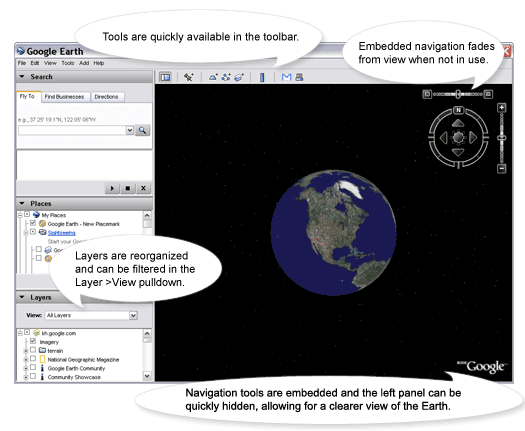
Google has released an updated version of their Google Earth site. The new version has all the features that use to be in the paid for version.

The site is great. The images are good and the ability to change the angle is surprisingly effective -- especially given that we know the satellite only took its shots from one angle.

With the elections coming up, the political maps are particularly timely for social studies classes.

There is a lot here. Give it a try and try stop using it. It's addictive.

T

Friday, November 03, 2006

Free File Converter

It is not as common as it once was, but every so often a student comes in with a file created at home in a format that your applications cannot read. I use to have a collection of file conversion utilities to handle these situations, but today I don't have any easily at hand. Zamzar is an online tool which takes any file up to 100 megs in size and turns it one of many other possible formats. Unfortunately, it does not handle my Real video files, but it gets most common formats.

Zamzar can probably be of most use with multimedia files. Unless you are creating all your content, you're probably going to be working with multiple formats. It's a real pain in the neck to have a sound track for your video only to find that it's an invalid format.

T

Thursday, November 02, 2006

Using Dirt-cheap Computers

Here is one of several locations where one can get older model computers. Like car prices, old equipment loses value fast. This particular Dell GX150 is being sold for $47. The cost of shipping will come close to the price of purchase.

These units can be useful for schools for a variety of reasons. For terminal clients, these devices are fine. The dedicated terminal clients cost several times more and don't offer significantly more benefits other than small physical size.

Another good use for these old units is to replace a broken computer in a old computer lab. You don't want to get a brand new computer because all the students will fight for the new computer. Getting a unit like the ones you already have makes life simpler.

And, if you use these computers with Linux, these boxes can make great servers.

In an earlier posting I mentioned donated computers. What buying these old computers provide is a bit more control over what you are receiving. Plus, a donation may include a variety of hardware and there are great advantages to having standard hardware.

T

Wednesday, November 01, 2006

Language Resource

Language Guide provides a fair amount of information for beginners in learning a foreign language. The languages include Spanish, Chinese, French, German Arabic, and a number of others.

T