Nine Ways Google Wave Can Alter the Course of Collaboration is a short slide show about the possible impact of Google Wave. While there are amazing up-sides to Google Wave, there are also possible downsides.
T
Showing posts with label Google. Show all posts
Showing posts with label Google. Show all posts
Thursday, August 06, 2009


Tuesday, February 10, 2009
The eyes have it: How we see web pages

Google's official blog has an interesting story on how users of their search results page move their eyes over the page. A "heat map" showing the intensity of where users' eyes tracked can be seen to the left. These maps are created by having a camera look at the user's eye as they look at the screen. The camera can tell which part of the screen is being looked at.
In the case of Google, the users' eyes were looking at the parts of the page with the most relevant information. This occurrence is not always the case. Frequently, web designers toss in lots of eye candy to pretty up the page. If you have something that is attracting the eye from what the user actually should be reading, then your site is probably going to be less satisfying to use.
This map is also telling in that it shows that people then to pop from place to place. Certainly, one would not expect to see this pattern with a book. This means that web designers need to create pages that are suitable for quick scanning. Use of font sizes, titles, icons, and graphics are as important as the content of the page. Well-written prose is not useful if people see it as a big block of dense text to be avoided.
T
Wednesday, September 19, 2007
Google announces its own "Power Point"
The lack of a presentation application was one of the problems with switching over to Google's online application suite. Now they have their own presentation application. If you already have Google Docs, you will find that when you go to create a new document, presentation will now be one of the options.
T
T
Wednesday, May 23, 2007
Google's new position on paid essay writing

The BBC is reporting that Google will stop selling advertisements for paid essay services. The Internet in general has made keeping students honest more difficult and paid essay services are one of the more obvious manifestations of this problem. Thanks, Google!
T
Thursday, May 03, 2007
Google Calendar Connector
 GCALDaemon is a process a way to allow you to synchronize your Google Calendar with Sunbird, an open source cousin of FireFox and ThunderBird.
This is a great idea because you don't want to miss appointments because of being off-line.
T
Wednesday, April 18, 2007
Google's new presentation application
Google's announcement that they are going to offer a presentation application along the lines of Power Point is of particular interest to schools. The reason I believe this to be the case is because students usually don't require the advanced features of a Microsoft Office. They also don't require Outlook or Access. The applications they need are presentation, word processing, and spreadsheets. They also need a graphic editing and/or paint program. But that's not really in Office, so the comparison is not relevant.
This means that you can have your students use Google Docs for all their school work. Because of the free storage and collaboration features, your work will be reduced significantly. I'll make another posting after I get to play with new application.
And, BTW, Google Spreadsheets now has charts. Students love to create charts.
T
This means that you can have your students use Google Docs for all their school work. Because of the free storage and collaboration features, your work will be reduced significantly. I'll make another posting after I get to play with new application.
And, BTW, Google Spreadsheets now has charts. Students love to create charts.
T
Friday, March 30, 2007
New Google Notebook

I've been using Google's Notebook clipping service for some time. While it's not as feature-rich as my old favorite, Onfolio, it is web-based and thus more handy. The new version just released has a few small improvements. Not a lot but enough to keep me from looking elsewhere.
T
Tuesday, January 09, 2007
Google Talk School Cell Phone
 Schools usually do a pretty bad job of providing phones to staff. To make matters worse, teachers frequently move between rooms -- and thus between phones. While office workers may leave the building to smoke or pickup some coffee, teachers frequently are on the job in play grounds and monitoring the loading and off-loading of school buses.
Clearly, school staff require mobile phones. While cell phones and signal repeaters can work, the cost of 40-70 dollars a month per phone can be opressive. Nokia has a Linux-based phone that run's Google's free talk service. Because the wireless signal is that of your computer network and not from a cell phone tower, you have great control over where the phones will work. To make make things better, the phones can operate on the Internet and be used to access school systems. So, for example, you want to find a parent's telephone number or look at the school calendar, this unit would be able to do it easily and for free. Google has just announced a new version that offers faster speed and more features. While the price of $300-400 may seem a lot when compared to the free cell phones the big carriers give away, the price is not all that much when one thinks of the monthly service charges and extra control your school will have.
T
Wednesday, November 29, 2006
Citing Google Books
The Chronicle has a good article on how to reference information found on Google books. This information can also be applied to all forms of online materials. This is an increasingly more common issue -- and most reference books don't provide information on the subject because the need is a recent one.
T
T
Thursday, November 16, 2006
Keeping the little kids safe on the Internet
 Middle school students and older may be actively looking for naughty content on the Internet, but most younger students simply stumble on it. While filters can help, they are not perfect. In Google, for example, one can still see the image icons for sites that one may not be able to visit. Even with the Google safety filter turned on, a great number of questionable images can appear.
The Zoo.com search engine goes a few steps beyond Google's safe search to make sure the content is acceptable for children. And, there are no images. The chance of accidentally hitting a bad site is greatly reduced. Combine this with a halfway decent filter and your school should be reasonably protected.
One more thing: you're not giving up Google to use zoo.com. They search Google and Yahoo! to obtain the search results. They just clean up the results list first.
T
Wednesday, November 08, 2006
The Free Online Backup Site You Already Own
 In July I posted on Microsoft's new FolderShare program. FolderShare allows you to synchronize data from one computer directory to one or more other computers.
One of the nice features of this system is that it takes advantage of the fact that most computers have more than enough storage space. There is no reason to pay some firm to store data online when your home computer is sitting there with lots of extra space and an always-on broadband connection.
Since July I've been using FolderShare and have found that it works well for simple file sharing. FolderShare pretty limited when compared to true backup systems. It can only handle ten libraries or packages of data. This may not sound too restrictive until you find out that it cannot share an entire drive letter. So, if your data is all under drive D, you cannot make a share out of drive D. You must go into the sub-directories and share them separately -- and be under ten. This is possible for small organizations and for individuals. Of course, one could set up multiple FolderShare accounts, but that might become too complex.
One great use of FolderShare is as a method for backing up laptop data. Install FolderShare on a laptop and then invite your home or office to share the data. Whenever the laptop is online FolderShare will make sure any new files will be transferred.
I suspect that FolderShare's features will improve in the near future. Google will most likely come out with some file storage system that will force everyone else in the market to respond. BTW, you need to be extra careful of the computers you backup to. I would recommend encrypting the directories you store your data. You don't want the data to be accidentally exposed. And, as you might expect, FolderShare is only for Windows.
T
Monday, November 06, 2006
New Google Earth
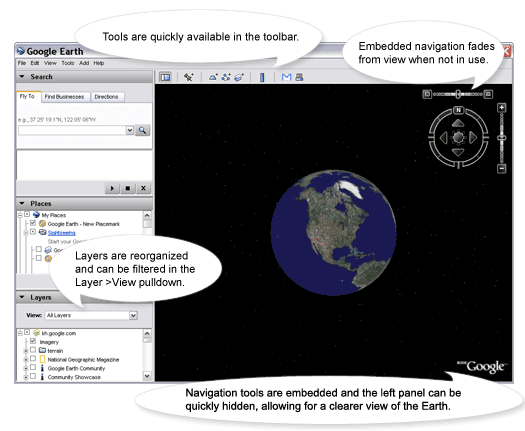 Google has released an updated version of their Google Earth site. The new version has all the features that use to be in the paid for version.
The site is great. The images are good and the ability to change the angle is surprisingly effective -- especially given that we know the satellite only took its shots from one angle.
With the elections coming up, the political maps are particularly timely for social studies classes.
There is a lot here. Give it a try and try stop using it. It's addictive.
T
Thursday, October 12, 2006
Google Teacher Academy
Google has recently announced a new program to create "Google Certified Teachers." The first training program will be Nov 7th at Google's headquarters. There will probably be many more in the future. They also have a new web site that provides information on how K-12 educators can best use Google's programs. I'm always amazed on the diversity of offerings Google has to offer. While each product may not be the best of its type, the collection of services -- and the low costs -- make them attractive to the educator on a budget.
T
T
Friday, September 29, 2006
New Google RSS Reader
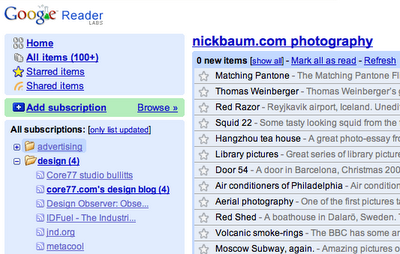 Google has just released a new version of its RSS Reader. The feel is a lot more comfortable. The previous version feel a bit awkward in places. It also has a number of key commands for fast processing. If you were on the fence concerning this service, now is the time to take another look. Now, if they could just update the Google Notebook system in the same way.
T
Thursday, September 21, 2006
Photo Mapper
 Trippermap is a great combination of global mapping and flixr images. Just imagine the interesting social studies projects or reports on school field trips one could do.
T
Tuesday, September 19, 2006
Google's SketchUp for 3D Modeling
 SketchUp is one of Google's new online tools. This one is great for students wanting to do some sort of 3D modeling. This could be very useful for science, math and social studies classes. If your school has good Internet bandwidth, this is a program certainly worth checking out. Below is what Google has to say.
T
"Google SketchUp (free) is an easy-to-learn 3D modeling program whose few simple tools enable you to create 3D models of houses, sheds, decks, home additions, woodworking projects – even space ships. You can add details, textures and glass to your models, design with dimensional accuracy, and place your finished models in Google Earth, share them with others by posting them to the 3D Warehouse, or print hard copies."
Wednesday, September 13, 2006
RSS Reader Review

TechCrunch has a good review of RSS readers. While you don't have to have a reader to see this blog, a feed/RSS reader is helpful in that it checks for new content without you having to go anywhere. Checking ten, twenty, or more blogs is now easy to do because anything of interest comes to your computer via the RSS reader.
There is no lack of potential feed readers. It's a matter of personal preference which one is right for you. I use the web-based Google Reader because I use multiple computers and I want the list of articles I've not yet read to be the same on every computer I use.
I was using OnFolio , a software application, but I had to remember when I went home where I was in my reading. OnFolio, BTW, is a great tool for collecting information from the Internet. I had to give up using it because it did not like my Windows terminal server, but that problem may get fixed now that Microsoft has purchased the OnFolio company. You'll be seeing more of OnFolio.
There is no harm in testing out a few systems. It's pretty easy to transfer your RSS subscriptions between readers. Plus, most of them are free.
T
Tuesday, August 29, 2006
Google Applications for Educators
 Google just announced that they are offering a free hosted suite of applications for businesses. They even allow the business to use its domain name. At present, the "suite" is basically the calendar and email program, but their word processor, Writely, will be added soon.
Google is also reaching out to schools. While I'm not sure their system would be usable for k-12 students, it might be fine for a small university. It could also be useful for the staff of a k-12 school. Obviously, one does need to have reliable and fast Internet access to use such a system. And it is clearly not a replacement for Microsoft's Office suite by an imagination at this point. But, if your school is looking for fairly simple features and is very cost sensitive, this Google solution could be what you're looking for.
T
Tuesday, August 15, 2006
Google's Pitch to Educators
 We all know that Google invents a new product every few days. Many of the products don't go anywhere. While it may be a very long time before Google's efforts to best Microsoft's Office suite comes to fruition, they do make a fairly solid case for how students can use their software. Here is what they have to say. If your school has good bandwidth but little money for applications, you may want to seriously consider this route.
T
Tuesday, May 23, 2006
Google Notebook
This is a great new tool for keeping track of information you or your students find on the Internet. While I personally like Onfolio -- now owned by Microsoft -- this free from Google looks very interesting. What I like about it is that the content is online and thus is available from any computer. That also makes it easy to share. This is definitely worth taking a look by anyone doing research work.
T
Google Notebook: "Web clipping and more..."
T
Google Notebook: "Web clipping and more..."
Subscribe to:
Posts (Atom)