 flixr has an interesting site devoted to examples of good web site designs. Since you probably won't have enough money for a designer for your next school web site, this is good place to see what you want.
T
flixr has an interesting site devoted to examples of good web site designs. Since you probably won't have enough money for a designer for your next school web site, this is good place to see what you want. Zemble is a social networking site that uses text messaging for communications. This system could be quite useful for a school. It could be used to send out notices about school events and announcements of snow days.
 A selection of educational articles found on Wikipedia can now be obtained on a CD-ROM. This article describes the project that put together the CD-ROM and provides a link to downloading it.
 Schools were not built to provide access for telephones. Installing a telephone system can be an expensive proposition. Given that most teachers have cell phones, why not use them? Most people have calling plans that make local calls free. Using cell phones also means that your staff can be reached regardless of their location -- even outside the building.
 There is a wide selection of online dictionaries but OneLook is the first "reverse dictionary" I've come across. It's great for situations where you know what the word means but you cannot remember the actual word. This could be useful for students and for your own work. It also works nicely as a type of thesaurus. It also has the ability to check the definitions of words you find in multiple online dictionaries.
 Middle school students and older may be actively looking for naughty content on the Internet, but most younger students simply stumble on it. While filters can help, they are not perfect. In Google, for example, one can still see the image icons for sites that one may not be able to visit. Even with the Google safety filter turned on, a great number of questionable images can appear.
 As your server closet gets more crowded with more and more servers, switches, routers and firewalls, the ability to monitor them becomes an increasingly difficult task. I started using KVM switches (Keyboard/Video/Mouse) to control my servers, but as the number of servers increased, I found that the tangle of thick KVM cables became a real bother. The back of my servers is already a web of Ethernet and power cables. The KVM cables made things a lot worse and in some cases would knock loose a power cable and bring down a server.
 LitSum is the best collection of book summaries I've seen. This site could help students to know if they want to read a particular book. It also good to know what's out there in case a student tries to pass off one of these summaries as their book report. Using online information is one of the problems the Internet has brought to the classroom. It's not that cheating was not going on before, but it is certainly easier now.
 Blender, when combined with programs such as GIMP, Ink Scape and NVU make for a fairly complete design setup. Blender is a three-D design tool. GIMP is like Photoshop while Ink Scape is like Illustrator. NVU is a web design tool, like Dreamweaver. I've used GIMP and found it to be quite usable. Some of the features are beyond me, but then so are many of the features in Photoshop.
 Thinkature is web based collaborative brainstorming space. It's like having a whiteboard for a project group meeting. This could be a useful tool for students attempting to put together projects. It also can be used to teach concept mapping and brainstorming skills. There are other systems like this one, but this is one of the best I've seen that is offered for free.
 In July I posted on Microsoft's new FolderShare program. FolderShare allows you to synchronize data from one computer directory to one or more other computers.
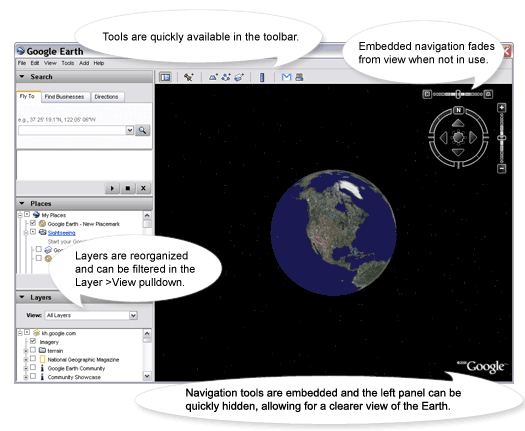 Google has released an updated version of their Google Earth site. The new version has all the features that use to be in the paid for version.
 It is not as common as it once was, but every so often a student comes in with a file created at home in a format that your applications cannot read. I use to have a collection of file conversion utilities to handle these situations, but today I don't have any easily at hand. Zamzar is an online tool which takes any file up to 100 megs in size and turns it one of many other possible formats. Unfortunately, it does not handle my Real video files, but it gets most common formats.
 Here is one of several locations where one can get older model computers. Like car prices, old equipment loses value fast. This particular Dell GX150 is being sold for $47. The cost of shipping will come close to the price of purchase.
 Language Guide provides a fair amount of information for beginners in learning a foreign language. The languages include Spanish, Chinese, French, German Arabic, and a number of others.
